Integrators can use the Covata Platform's API to develop their own applications that directly leverage Covata's powerful data-centric security features.
A Safe Share administrator can configure the access that their integrators' applications have to their Covata Platform's resources, by 'registering' these applications on their Covata Platform instance. Access to these resources is based on the OAuth 2.0 Authorization Framework, which the Covata Platform uses for authentication and authorization.
From the Covata Platform's perspective, an integrator's application is a 'client application', regardless of whether this application is:
- A server-side web application,
- Designed to run natively on a mobile device such as a tablet or phone,
- Designed to run natively on any other operating system (e.g. destkop/laptop computers) or
- User agent-based (e.g. runs client-side in a web browser).
A client application cannot access any resources on the Covata Platform until it has first been registered with the Covata Platform.
Configuring a client application
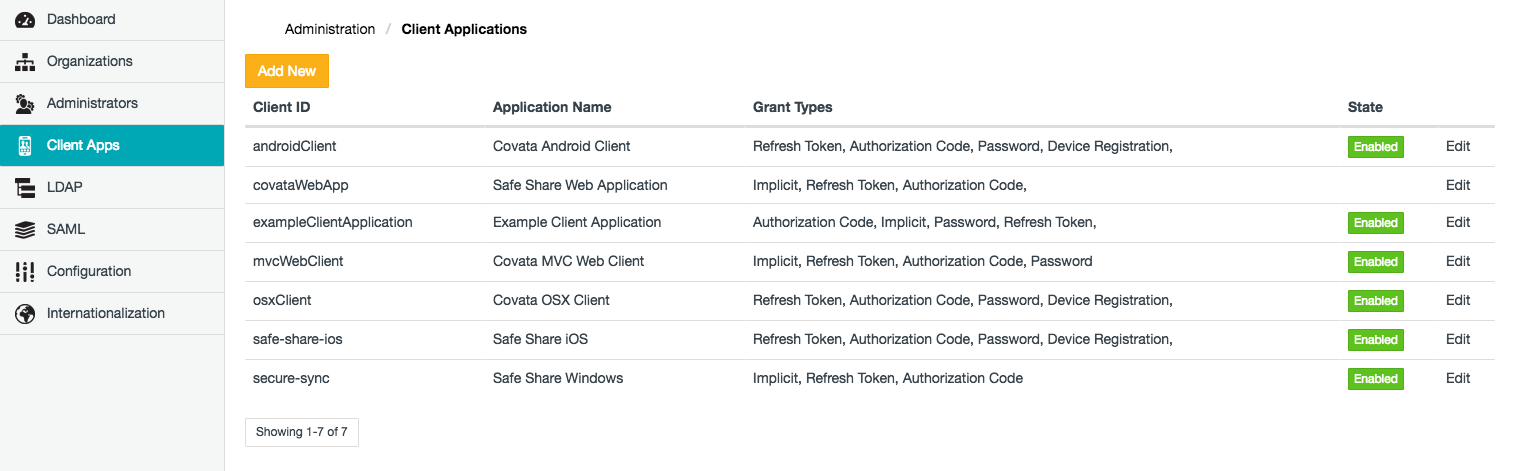
The Client Applications page of Safe Share Administration (above) allows:
Registering a new client application
To register a new client application with the Covata Platform:
- Sign in to Safe Share Administration.
- Click the Client Apps option on the left of the Safe Share Administration interface to open the Client Applications page.
- Click the Add New button.
- In the Add Client Application dialog box, complete the fields (described in detail in the table below) to register the client application.
- Click Save and the client application will appear as a new entry on the Client Applications page.
The following table describes all mandatory fields that must be completed to register a client application on the Covata Platform.
Tip: Integrators developing client applications using the Covata Platform's API may find the information provided in the following table useful.
| Field | Description |
| Application Name | The name of the client application which will appear to Covata users (when they attempt to authenticate to the Covata Platform from this client application). |
| Client ID | The 'client ID'/'client identifier' value of the client application.
This value, along with the Client Secret (below), form the application's 'client credentials' which are required for OAuth 2.0 authentication and authorization when a Covata user authenticates (with their own 'user credentials') to the Covata Platform. For more information about these terms, see the definition for grant type ** (below).
When a Safe Share administrator registers a new client application, the Covata Platform automatically generates a client ID based on a Universally Unique Identifier (UUID). The Safe Share administrator, however, can override this client ID value.
Notes: The client ID value:
-
Is usually hard-coded into the client application, since this value is passed to the Covata Platform during most OAuth 2.0 user authentication and authorization events.
-
Must be unique amongst all client applications registered on the Covata Platform.
For more information about client IDs and their use in client applications, see the Client Types and Client Identifier sections of the OAuth 2.0 Authorization Framework specification. In this specification, a 'client' refers to a client application and the 'authorization server' refers to the Covata Platform.
|
| Client Secret | The 'client secret' value of the client application.
This value, along with the Client ID (above), form the application's 'client credentials' which are required for OAuth 2.0 authentication and authorization when a Covata user authenticates (with their own 'user credentials') to the Covata Platform. For more information about these terms, see the definition for grant type ** (below).
When a Safe Share administrator registers a new client application, the Covata Platform automatically generates a client secret based on a Universally Unique Identifier (UUID). The Safe Share administrator, however, can override this client secret value.
Note: Like the client ID, the client secret value is also usually hard-coded into the client application, since this value is passed to the Covata Platform during most OAuth 2.0 user authentication and authorization events. The exception to this is the OAuth 2.0 implicit grant type, where only the client ID value of the application's client credentials is passed to the Covata Platform during user authentication and authorization.
For more information about client secrets and their use in client applications, see the Client Types section and Client Password subsection (within Client Authentication) of the OAuth 2.0 Authorization Framework specification. In this specification, a 'client' refers to a client application and the 'authorization server' refers to the Covata Platform.
|
| Access Token Validity | The number of seconds that an access token issued by the Covata Platform to a client application is valid for. (Access tokens are explained in more detail in the Grant types description below.) Upon expiry of the access token, the client application would need to either:
-
Submit a valid refresh token to the Covata Platform in exchange for a fresh access token, or
-
Request the Covata user to re-authenticate to the Covata Platform (with their user credentials) to obtain a fresh access token.
Note: To maximize security, it is recommended that access tokens have relatively short life spans (expiring within minutes, for example, up to a maximum of 10 minutes). |
| Grant Types | The grant type/s (also known as authorization grant/s) that the Covata Platform permits the client application to use to issue the application with an access token.
An access token:
-
Defines resources on the Covata Platform that are available to an authenticated Covata user by virtue of their roles (configurable by either a Safe Share administrator or an Organization administrator). These resources could include:
-
Is issued by the Covata Platform to the client application to grant the client application access to the Covata user's resources on the Covata Platform.
-
Has a limited life span. Once the access token expires, the client application loses its access to the Covata Platform's resources until the user re-authenticates to the Covata Platform or a refresh token is used to obtain a fresh access token. A refresh token can initially be issued to a client application by the Covata Platform following successful OAuth 2.0 authentication and authorization. When the current access token expires, this refresh token is exchanged by the client application for a fresh access token from the Covata Platform (without the user having to re-authenticate).
The Covata Platform supports the following OAuth 2.0 grant types ** , listed in order from most secure down to least secure (along with the types of client applications best suited to implement these grant types):
-
Authorization Code - Best suited for the following types of client applications:
-
Server-side web applications.
-
Native desktop/laptop or mobile device applications.
For more information about this grant type, see the Grant type details table below.
-
Implicit - Best suited for user agent-based applications, such as one that runs client-side in a web browser.
For more information about this grant type, see the Grant type details table below.
-
Password - Best suited for the following types of client applications:
-
Native desktop/laptop or mobile device applications.
-
Administrator/system-run services (e.g. a scheduled job).
For more information about this grant type, see the Grant type details table below.
The Add/Edit Client Application dialog box also indicates the following options within the Grant Types section. While these options are not OAuth 2.0 grant types themselves, they support the OAuth 2.0 grant types (above):
-
Allow Refresh Token - Determines if the Covata Platform can issue refresh tokens to the client application, which the client application can then use to request for (a) new access token/s. This allows a Covata user's session to continue (potentially indefinitely), without requiring the user to sign in again beyond the expiry of their access token. This option is only applicable when the Authorization Code and/or Password grant type option/s (above) is/are selected.
-
Allow Device Registration - Determines if the client application (running on a specific device - typically on a mobile device platform such as iOS or Android) can authenticate a specific Covata user with a passcode. Once a Covata user authenticates (with their email address and password) to the Covata Platform through a client application running on the device, the user can then set a passcode that can be utilized to authenticate themselves to the Covata Platform (without the need for email address/password credentials). To maximize security, a passcode is tied to a specific Covata user and device.
** In the context of Covata technologies, a grant type/authorization grant is a credential representing a Covata user's authorization to access that user's protected resources on the Covata Platform. This credential is used by the client application to obtain an access token. The following concepts are key components which are required to complete/obtain a grant type:
-
User credentials - credentials that consist of a Covata user's email address and password (which the Covata user either had received in their original 'account created' email notification when their account was added through Organization Administration or Safe Share Administration, or had changed themselves).
-
Client credentials - credentials that consist of both the client ID and client secret.
|
| Refresh Token Validity | The number of seconds that a refresh token issued by the Covata Platform to a client application is valid for. This value must be greater than the access token validity value above.
If a refresh token expires, the client application requires a Covata user to re-authenticate in order to continue accessing the Covata Platform's resources (which are available to that user).
Note: This field is only applicable (and available) when the Allow Refresh Token option (of Grant Types above) is selected, which in turn is only available when the Authorization Code and/or Password grant type option/s is/are also selected.
|
| Registered redirect URI(s) | A list of one or more valid Uniform Resource Identifiers (URIs) which the Covata Platform uses to verify the value of the redirect URI (also known as a redirection endpoint) parameter sent by the client application to the Covata Platform (during an OAuth 2.0 authentication and authorization request to obtain an access token). If any part of the redirect URI sent by the client application (from the start of this URI) does not match one of the registered redirect URIs specified in this field, then the Covata Platform terminates the OAuth 2.0 authentication and authorization process.
Notes:
-
This field is only applicable (and available) when the Authorization Code and/or Implicit grant type option/s (of Grant Types above) is/are selected, since these grant types require users to authenticate directly through a web interface/user agent served by the Covata Platform. The client application's 'redirect URI/redirection endpoint' is what the Covata Platform redirects this user agent to after the authentication step.
-
If communication between the client application and Covata Platform occurs over the Internet and the client application's redirect URI (to which the Covata Platform sends its response containing the access token) is based on the HTTP protocol, then for security reasons, ensure that:
-
This redirect URI has been configured to use HTTPS (not just HTTP).
-
The registered redirect URIs specified in this field are prefixed with
https:// - i.e. no URIs in this field should be prefixed by http://.
|
Grant type details
The following table provides details about the OAuth 2.0 grant types that the Covata Platform can permit a client application to use (i.e. to issue that application with an access token). See Grant Types (above) for an explanation about access tokens issued by the Covata Platform.
These details below explain the types of information conveyed between the client application and Covata Platform, as well as the mode by which this information is conveyed and hence, the security implications associated with implementing these grant types in a client application.
| Grant type | Details |
| Authorization Code | The authorization code grant type securely handles the conveyance of user credentials, client credentials and access/refresh tokens between the client application and Covata Platform. The Covata Platform authenticates both the user and client application with their respective credentials. User credentials are never exposed to the client application, since users authenticate directly through a web interface served by the Covata Platform. After successful user authentication, access/refresh tokens can then be sent securely by the Covata Platform to the client application, without these tokens being exposed to the browser (i.e. the 'user agent'). Therefore:
-
This is the most secure (and hence, recommended) OAuth 2.0 grant type to implement in a client application.
-
The authorization code grant type should be implemented by client applications that are server-side web applications, since these types of applications can keep their source code (and hence, client credentials) private. Since the secrecy of client credentials can be maintained by the client application itself, these types of applications are known as 'confidential clients'.
-
This grant type can also be implemented by client applications that are 'native', such as mobile or desktop applications. However, it is assumed that client credentials are not secure in these types of applications and are capable of being extracted. Since the secrecy of client credentials cannot be maintained by the client application, these types of applications are known as 'public clients'.
Note: Relying on client credentials as a security measure in native applications is not recommended, for the following reason:
-
Since a native client application is a 'public client', if the application's client credentials are extracted and implemented in an unauthorized client application, then the Covata Platform is unable to verify the authenticity of the genuine client application based on these credentials. If the credentials of a Covata user (who accesses the genuine client application) were procured through some other means (e.g. phishing) and then utilized to authenticate to the Covata Platform through the unauthorized client application, then the unauthorized application could gain access to the Covata Platform's resources (which are available to that user).
If an integrator relies on client credentials for security in their native application (which is not recommended) and suspicion arises that these credentials have been stolen, then to immediately address this security breach, the integrator's client application would need to be disabled to deny access to the Covata Platform of all unauthorized client applications (which have implemented these stolen client credentials). Unfortunately, this action denies access to all genuine client application installations too. Therefore, after re-configuring the registered client application with new client credentials (as well as rebuilding and rolling out a new version of the genuine client application containing these new client credentials), the client application can then be re-enabled on the Covata Platform.
|
| Implicit | The implicit grant type securely handles the conveyance of user credentials between the client application and Covata Platform. The Covata Platform authenticates the user with their credentials. However, as part of the OAuth 2.0 protocol, the client application is not authenticated with this grant type; the Covata Platform only verifies the identity of the client application through the client ID. While a user's credentials are never exposed to the client application (because users authenticate directly through a web interface served by the Covata Platform); unlike the authorization code grant type, the access token is sent directly by the Covata Platform to the client application in a URI fragment. Therefore:
-
This OAuth 2.0 grant type is a less secure to implement in a client application (than authorization code above) for the following reasons:
-
Since the Covata Platform does not authenticate the client application, the Covata Platform cannot verify the authenticity of the client application.
-
The availability of the access token in the URI fragment sent by the Covata Platform can expose the access token to unauthorized parties for malicious use - including an attack via an authenticated Covata user (for example, by means of phishing).
-
As a result of this grant type's inherent risk in exposing access tokens to unauthorized parties, refresh tokens are not issued when using the implicit grant type.
-
The implicit grant type is typically implemented by client applications that are 'user agent-based', such as web browser applications where the executable code is downloaded and runs in the browser itself (rather than on a server), since the client credentials are available to the Covata user. The implementation of the implicit grant type in a web browser application can allow for the seamless integration of Covata user authentication and authorization with OAuth 2.0, whilst keeping the user credentials secure.
|
| Password | The password grant type delegates the handling of user credentials to the client application itself. Both the user and client credentials are sent from the client application to the Covata Platform for authentication. Access/refresh tokens sent by the Covata Platform to the client application (after successful user authentication) can then be captured by the client application, reducing the ability of the Covata user to access the access/refresh tokens themselves. Be aware that:
-
This OAuth 2.0 grant type is less secure to implement in a client application (than both authorization code and implicit above), because the delegated handling of user credentials to the client application increases the possibility of these credentials being exposed to unauthorized parties for malicious use. Exposure of user credentials to the client application is minimized by the fact that these credentials need only be used once (for a single request by the client application) and exchanged for an access token; since this grant type allows client applications to submit refresh tokens (which is recommended) in exchange for fresh access tokens, there is no need for client applications to store user credentials.
-
The password grant type should only be implemented by native client applications (i.e. mobile or desktop applications), when a high level of trust between the Covata user and the client application itself can be assured. These are client applications which:
-
Are a part of the operating system they run on (i.e. client applications developed by the same organization/group who developed the operating system it runs on),
-
Execute with a high level of privilege, or
-
Were developed by Covata.
Assuming the client application meets this criterion of trust, the password grant type could also be implemented by such a client application when the more secure authorization code is neither available nor appropriate to implement.
|
Editing a registered client application
To edit a registered client application on the Covata Platform:
- Sign in to Safe Share Administration.
- Click the Client Apps option on the left of the Safe Share Administration interface to open the Client Applications page.
- Scroll to the relevant client application (if necessary) and click its Edit link.
- In the Edit Client Application dialog box, modify the registered client application's fields, which are described in detail in the table (above).
- Click Save and the registered client application will be updated.
Disabling and re-enabling a client application
Disabling a registered client application prevents any installations of the client application from accessing the Covata Platform. This is useful when a client application's access to the Covata Platform needs to be disabled (either temporarily or permanently), or suspicion arises that the client application's credentials have been stolen.
To disable, enable or re-enable a registered client application on the Covata Platform:
- Sign in to Safe Share Administration.
- Click the Client Apps option on the left of the Safe Share Administration interface to open the Client Applications page.
- To:
- Disable the client application - click its green Enabled button (in the State column towards the right of the page), until this button changes red and indicates Disabled.
- Enable or re-enable the client application - click its red Disabled button (in the State column) until the button changes green and indicates Enabled.
Note: When a client application is disabled it can still be edited. This feature allows a registered client application to be configured before access to the Covata Platform is enabled.