 |
Safe Share for Web User's Guide

|
|
Safe Share for Web User's Guide
|
This documentation is for 3.4.x versions of the Covata Safe Share for Web application.
Please refer to our important notice for information that relates to this documentation.
Safe Share for Web is a web application (of the Covata Platform) which allows you to securely store, access and share any data anywhere.
Using Safe Share, you can securely upload, store, share and download files easily through a web browser on your computer.
Since Safe Share is a web application, it can be accessed conveniently from:
All uploaded files are encrypted before they reach storage managed by the Covata Platform.
These features allow you (as the owner of files secured through Safe Share applications) to share your own content securely with people you deal with regularly (such as colleagues within your organization) as well as other people who may not yet be members of your organization or registered on the Covata Platform (for example, customers and partners).
* While Safe Share for Web does not support the upload and storage of files when used on tablet, phone and other devices with compatible web browsers, native Safe Share applications are available for many of these devices which do provide these capabilities, along with a complete Safe Share application experience.
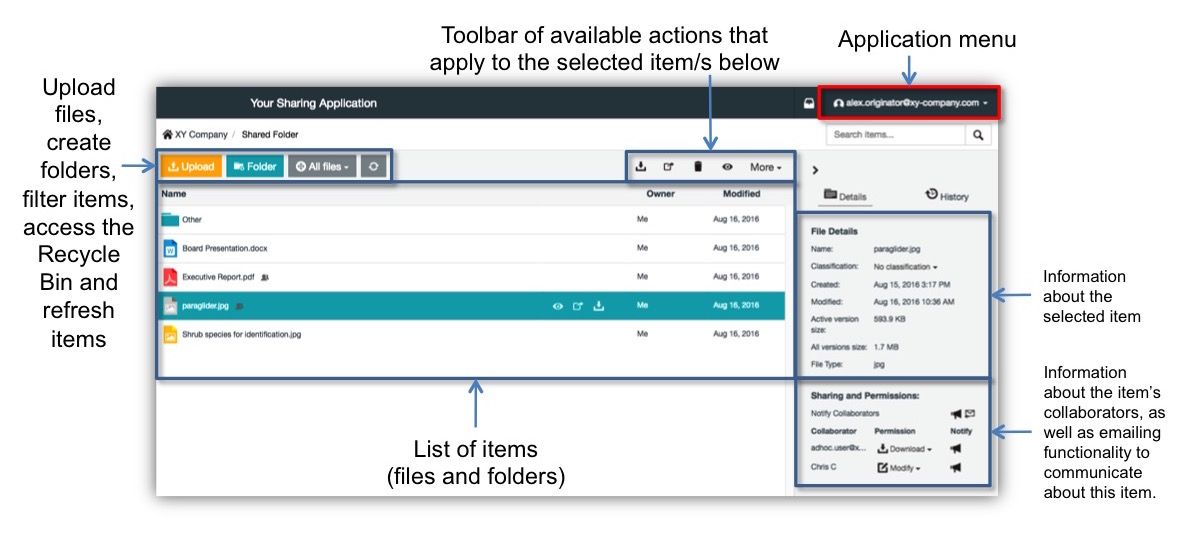
A user of Safe Share applications (known as a Covata user) uploads, stores, shares, accesses and manages content (i.e. files and folders) through a self-contained unit called an organization.
An organization is self-contained meaning that the creation, sharing and manipulation of content is handled solely within the scope of an organization itself. (This Covata Platform feature is also known as multitenancy, whereby each organization represents an individual 'tenant'.)
Be aware, however, that a Covata user can:
This means that any Covata user's ownership of content (or permissions to access this content) as well as the roles they have been granted to access Safe Share features is specific to each organization.