 |
Safe Share for Windows User's Guide
|
|
Safe Share for Windows User's Guide
|
To maximise data security, Safe Share for Windows always encrypts or decrypts files locally on a Covata user's computer. Therefore, encrypted content within a Covata user's 'Safe Share' folder must be either:
My Secured Files subfolder whenever the user stores personally owned content securely.Shared With Me subfolder (for decryption) whenever another Covata user shares secure content (through any Safe Share application) with the currently signed-in Covata user. If this encrypted content is not locally available, Safe Share for Windows first downloads the content from remote storage managed by the Covata Platform before decryption.Caching encrypted content locally avoids the need for Safe Share for Windows download a file's content from remote storage each time the file needs to be decrypted. On the other hand, caching this content may begin to consume an increasing amount of local disk/drive space over time.
Therefore, the Safe Share for Windows cache policy feature allows a user to define which folders (within the user's Safe Share folders) will retain and store (i.e. cache) its encrypted content locally on the computer.
By default, Safe Share for Windows does not cache any encrypted content locally. This means that whenever encrypted content is either generated for upload to storage or downloaded for decryption, Safe Share for Windows automatically deletes this local encrypted content following these actions (i.e. when the encrypted content is no longer required).
Tip: Within any 'Safe Share' folder, a Covata-secured file with the:
.covfile extension indicates a file whose content is cached locally and.covlfile extension indicates a file whose content is not cached locally. The size of any one of these files is < 1 KB. Each time a.covlfile is decrypted, Safe Share for Windows first downloads its encrypted content from remote storage.
To access Safe Share for Windows' cache policy settings feature:


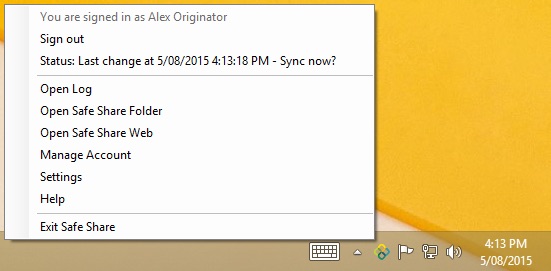
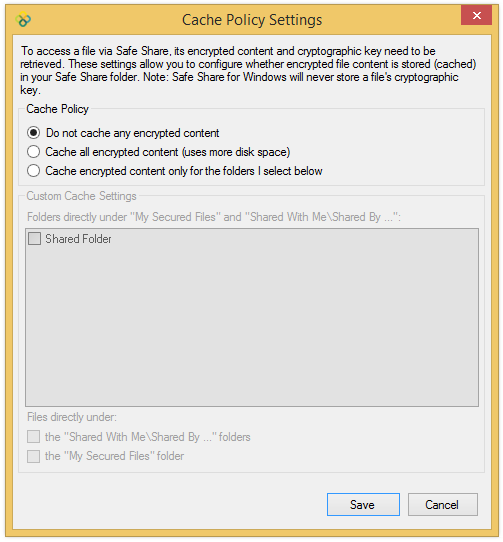
Cache policy settings are specific to the Covata user account with which you are currently signed in.
To modify Safe Share for Windows' cache policy settings:
Safe Share folders) being retained, such that whenever any file's encrypted content needs to be decrypted, its content does not need to be downloaded from remote storage. Safe Share folders) whose encrypted content is not (yet) stored locally, will be downloaded and subsequently cached when you next decrypt that file. Safe Share subfolders (My Secured Files and Shared With Me) will retain encrypted content. My Secured Files folder and content will be absent from this dialog box. My Secured Files and Shared With Me\Shared By ... are listed in the box. Therefore, choosing one of these folders makes Safe Share for Windows cache every file contained within this folder, including all of its subfolders. My Secured Files and Shared With Me\Shared By ... will be clear (i.e. not cache any encrypted content) until you explicitly set these folders to do so through this dialog box. Shared By ... folder contained within the Shared With Me subfolder. My Secured Files subfolder.