 |
SafeShare Administrator's Guide

|
|
SafeShare Administrator's Guide
|
The Configuration page allows Organisation administrators to modify a restricted set of organisation-specific properties that tweak the specific functional aspects and the behavior of their organisation on the Covata Platform.
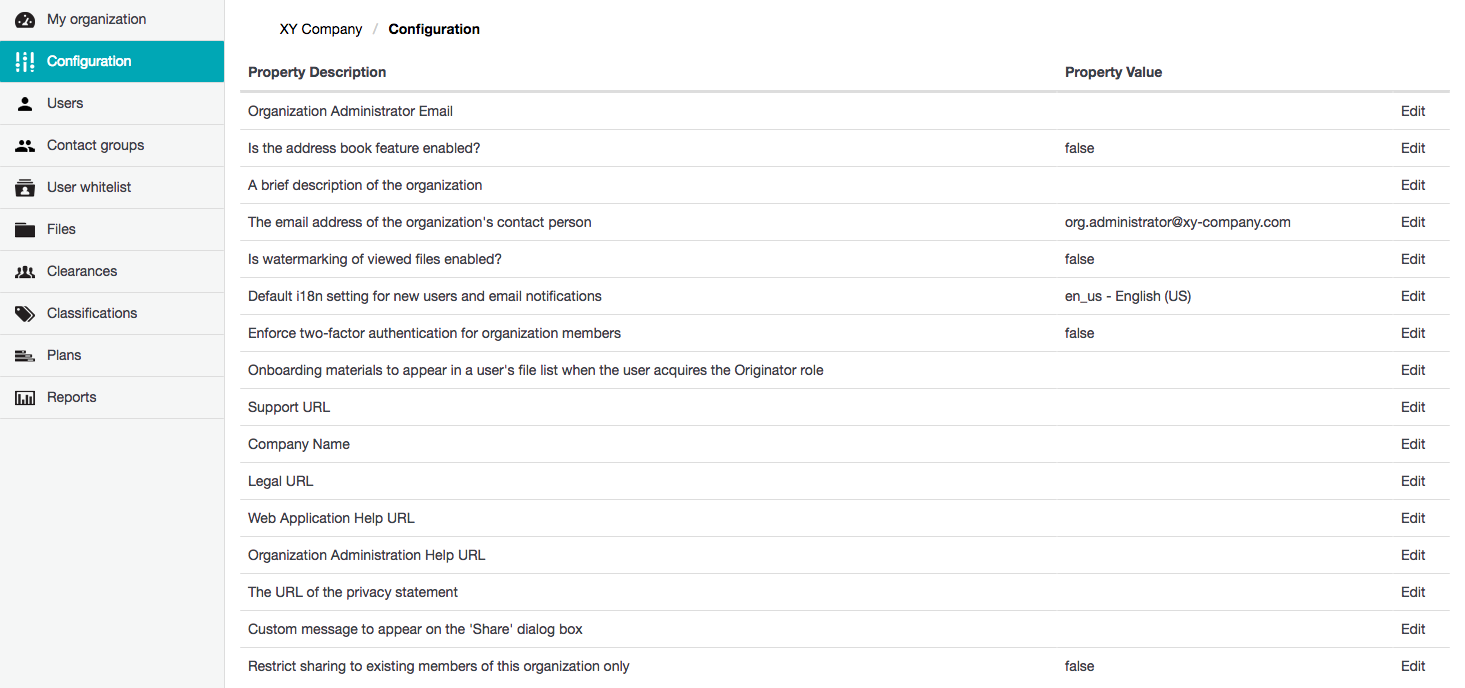
To modify a SafeShare Organisation Administration property value:
true or false, the Edit Config Property dialog box has a Property Value check box, which should be selected for true or cleared for false.The following SafeShare Organisation Administration properties are available:
| Property | Detailed description |
|---|---|
| Organisation Admin Email | The contact email address, typically for an Organisation administrator, which is:
See Administering users within an organisation in the SafeShare Organisation Administration section of this guide for more information. Notes:
|
| Is the address book feature enabled? | Determines whether (i.e. true) or not (i.e. false) the organisation's address book feature is enabled. The address book feature allows a user to discover (through autocompletion) other Covata user members within their organisation by the user typing the first few characters of a member account's email address, when sharing an item. If this property's value is:
|
| A brief description of the organisation | As the name of this property indicates. This field's purpose is only to provide Organisation administrators with additional information about their organisation. Be aware that this description is not displayed anywhere else throughout the interfaces of Organisation Administration and SafeShare applications (including SafeShare Administration). |
| The email address of the organisation's contact person | As the name of this property indicates. This property's purpose is to provide SafeShare administrators with the email address of the organisation's contact person, which appears in the Contact Person column on the Organisations page of SafeShare Administration. Be aware that this contact person:
|
| Is watermarking of viewed files enabled? | Determines whether (i.e. true) or not (i.e. false) the watermarking feature is enabled for all viewable files created within your organisation. The watermarking feature:
|
| Default i18n setting for new users and email notifications | The default language for all new Covata user accounts created on the Covata Platform * as a result of the users' accounts being added to the organisation.
* These new user accounts are created because the user's email address has not yet been registered on the Covata Platform. |
| Enforce two-factor authentication for organisation members | Determines whether (i.e. true) or not (i.e. false) the two-factor authentication (2FA) feature is enforced for all Covata users who are members of your organisation. This includes your own Organisation administrator account. Note: Take caution before setting this value to true. If any members of your organisation (including yourself) are not prepared to configure 2FA on their account, they may be unable to sign in successfully through the Covata Sign-in page, thereby preventing these users' access to:
|
| Onboarding materials to appear in a user's file list when the user acquires the Originator role | A file or folder (typically containing onboarding materials) that an Organisation administrator can choose to be automatically shared with Covata users in the organisation who acquire the Originator role. When an Organisation administrator chooses one of their items through this property, this feature becomes active, which results in any users within the organisation who subsequently acquire the Originator role being automatically shared this chosen item. A user's account acquires the Originator role when this account is either:
Be aware that this feature has the following requirements and characteristics:
|
| Support URL | The URL of the company's/organisation's support page, which is accessible from the Support link in the footer of SafeShare for Web and Organisation Administration as well as from Covata Notification email messages. Note: This property's default value is empty. In such circumstances, the Support URL property's value (defined through System details properties - see Configuring SafeShare Administration properties for more information), is used as the fallback, which by default is the Support page on the Covata web site. |
| Company Name | The company/organisation name which appears throughout Covata Notification email messages. Note: This property's default value is empty. In such circumstances, the Company Name property's value (defined through System details properties - see Configuring SafeShare Administration properties for more information), is used as the fallback, which by default is 'Covata'. |
| Legal URL | The URL of the company's/organisation's legal page, which is accessible from the Legal link in the footer of SafeShare for Web and Organisation Administration. Note: This property's default value is empty. In such circumstances, the Legal URL property's value (defined through System details properties - see Configuring SafeShare Administration properties for more information), is used as the fallback, which by default is the Covata End User License Agreement. |
| Web Application Help URL | The URL of the help documentation for the Covata SafeShare for Web application, which is accessible from the Help option/link available from the user's email address drop-down menu at the top-right of SafeShare for Web (and from the footer). Note: This property's default value is empty. In such circumstances, the Web Application Help URL property's value (defined through System details properties - see Configuring SafeShare Administration properties for more information), is used as the fallback, which by default is the SafeShare for Web User's Guide on the Covata documentation web site. |
| Organisation Administration Help URL | The URL of the help documentation for SafeShare Organisation Administration, which is accessible from the Help option/link available from the email address drop-down menu at the top-right of SafeShare Organisation Administration (and from the footer). Note: This property's default value is empty. In such circumstances, the Organisation Administration Help URL property's value (defined through System details properties - see Configuring SafeShare Administration properties for more information), is used as the fallback, which by default is the Organisation Administrator's Guide on the Covata documentation web site. |
| The URL of the privacy statement | An additional (custom) URL for the company's/organisation's privacy statement page, which is accessible from the Privacy:
|
| Custom message to appear on the 'Share' dialog box | A custom message (typically a warning) that will be shown at the base of the 'Share' dialog box (near the Share button). Note: The default value of this property is empty. Be aware that once this property's value has been set, it can also be cleared when edited (by clearing its value before saving). |
| Restrict sharing to existing members of this organisation only | Determines whether (i.e. false) or not (i.e. true) Covata users in the organisation are allowed to share items with people who are not already members of the organisation. If this value is set to true, the Covata Platform will only permit items in the organisation being shared with Covata users whose accounts are existing members of the organisation. |
