 |
SafeShare Administrator's Guide

|
|
SafeShare Administrator's Guide
|
The Configuration page allows SafeShare administrators to modify a restricted set of properties on their Covata Platform instance, which are used to tweak specific functional aspects and the behavior of their Covata Platform instance.
Modifying these properties affects the behavior of SafeShare across all organisations configured on the Covata Platform.
Note: Other properties in configuration files can be modified by systems administrator/s responsible for setting up on-site deployments of the Covata Platform.
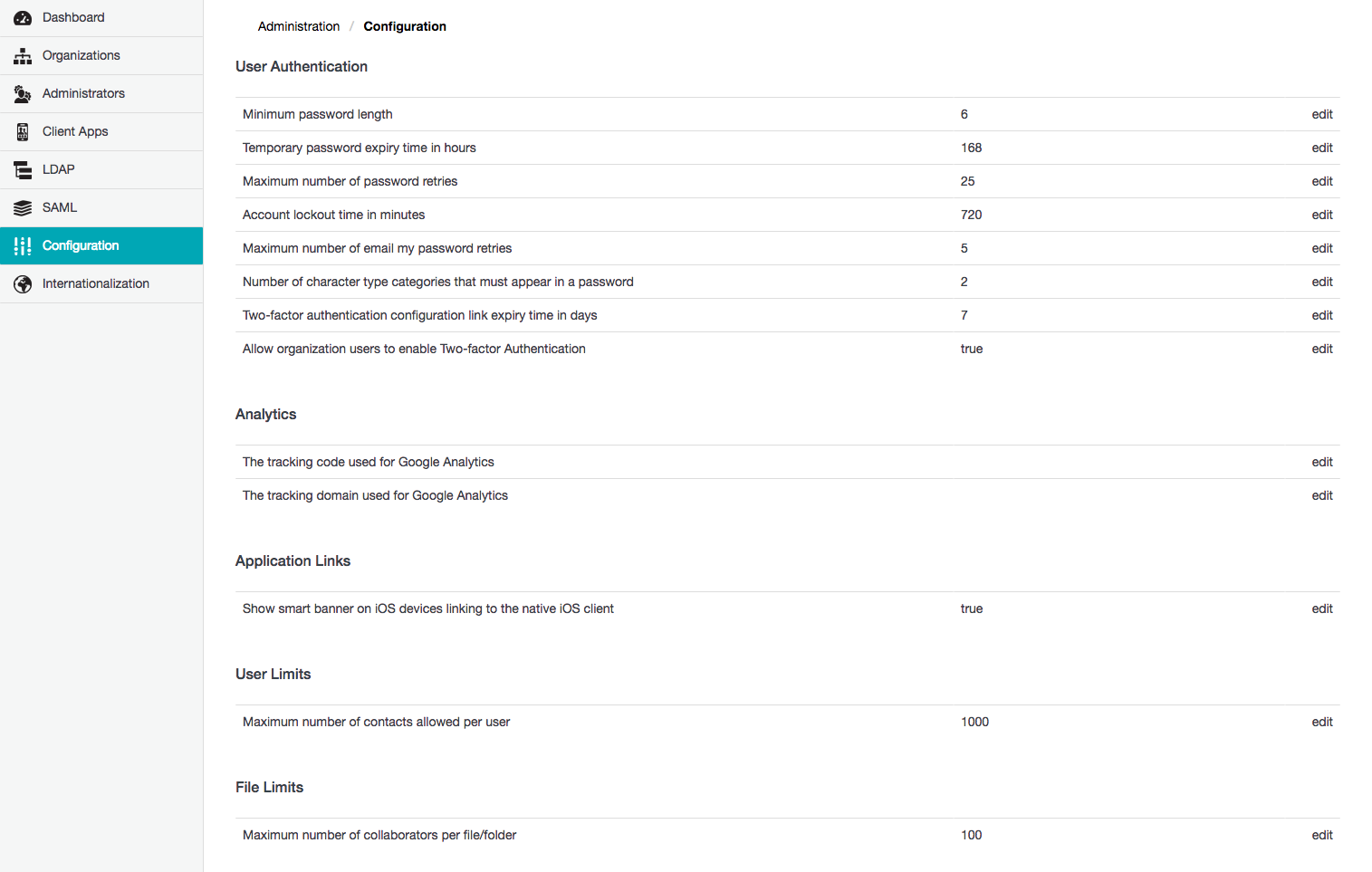
To modify a SafeShare Administration property value:
true or false, the Edit Configuration dialog box has a Property Value check box, which should be selected for true or cleared for false.The following SafeShare Administration properties are available in the following categories.
The User Authentication properties section allows the configuration of factors that affect how users sign in to SafeShare.
See Modifying a SafeShare Administration property value above for instructions on how to modify these properties' values.
| Property | Detailed description |
|---|---|
| Minimum password length | The minimum number of characters required for a Local user's password. This property has no affect on LDAP user's password since the authentication of LDAP users is delegated to their respective LDAP server. |
| Temporary password expiry time in hours | When a new Local Covata user account is created, the user receives an email notification containing a temporary password (generated by the Covata Platform), which the user requires to set their own password for their user account. Hence, the value of this property defines the validity of this temporary password. Note: If this temporary password expires, the user can still set their password through the Covata Sign-in page by clicking either the Don't have a password? or Forgot your password button and following the instructions in the resulting email notification sent to their email address. |
| Maximum number of password retries | The maximum number of incorrect sign-in attempts permitted by a Covata user mistyping their password before the user account becomes locked. The user will need to do one of the following to unlock their account:
|
| Account lockout time in minutes | The amount of time that a Covata user needs to wait before their user account (which was locked as a result of the user mistyping their password beyond the Maximum number of password retries above, during sign-in) is automatically unlocked by the Covata Platform. This amount of time also defines the period for which the link to unlock a user's account (contained in the email notification sent to the user) is valid. Important: Ensure this value is positive and do not set it to |
| Maximum number of email my password retries | The maximum number of times that a Covata user can click either Don't have a password? or Forgot your password, be sent an email notification containing either a one-time access link/password or password reset instructions and fail to successfully sign in, before their account is locked. Notes:
|
| Number of character type categories that must appear in a password | There are four categories of character types that can be used in a password:
|
| Two-factor authentication configuration link expiry time in days | When two-factor authentication (2FA) has been enabled on a Covata user account (by the user themselves through SafeShare for Web, Organisation Administration or SafeShare Administration, by a SafeShare administrator on any SafeShare administrator's account, or by an Organisation administrator for all members of their organisation) the user receives an email notification informing them about this. This email notification contains a time-limited configuration link, which leads to step-by-step instructions for the user to:
|
| Allow organisation users to enable Two-factor Authentication | Prevents any Covata user from being able to set 2FA on their account (see the 'My Account' feature of the SafeShare for Web User's Guide for more information). This also prevents the ability for Organisation administrators to set 2FA for all members of their organisation through Organisation Administration, as well as SafeShare administrators to set 2FA on any SafeShare administrator's account through SafeShare Administration. |
| Password validity in days | The number of days from the time when a Covata user last changes their password until this user is required to change their password again. Note: For this SafeShare Administration property to take effect, the Password expiration enabled property (below) must be set to true. |
| Password expiration enabled | Determines whether (i.e. true) or not (i.e. false) the Covata Platform enforces every Covata user (whose account is registered on the system) to change their password after their Password validity in days period has passed. Note: When a Covata user changes their password, the Covata Platform checks to ensure that the user does not specify the same password utilised when last changing their password. However, the Covata Platform neither keeps nor acts upon an historical record of previously used passwords. |
The Analytics properties section allows the configuration of Google Analytics properties, which collect data on visitor traffic through SafeShare for Web, Organisation Administration and SafeShare Administration.
See Modifying a SafeShare Administration property value above for instructions on how to modify these properties' values.
| Property | Detailed description |
|---|---|
| The tracking code used for Google Analytics | The tracking code given to you when you sign up for Google Analytics. Note: For Google Analytics to work with your Covata Platform instance, this value must be used in conjunction with The tracking domain used for Google Analytics (below). |
| The tracking domain used for Google Analytics | The domain of your Covata Platform's web server. Note: For Google Analytics to work with your Covata Platform instance, this value must be used in conjunction with The tracking code used for Google Analytics (above). |
The Application Links properties section allows the configuration (i.e. exposure) of links to SafeShare client applications, which are better designed for the platform on which the user is currently accessing SafeShare.
See Modifying a SafeShare Administration property value above for instructions on how to modify these properties' values.
| Property | Detailed description |
|---|---|
| Show smart banner on iOS devices linking to the native iOS client | Sets a 'flag' on the Covata Platform which results in a smart banner appearing at the top of SafeShare for Web pages whenever it is accessed through Safari on iOS devices. This encourages users of iOS devices who have clicked a direct URL to an item from 'New items have been shared with you' email notification (which opens the item in SafeShare for Web) to access the item in SafeShare for iOS instead (by clicking the link in the smart banner). |
The User Limits properties section allows the configuration of limits applied to Covata user accounts.
| Maximum number of contacts allowed per user | The maximum number of contacts that any given Covata user can add to their account through SafeShare for Web, as well as SafeShare for Windows or iOS. |
The File Limits properties section allows the configuration of limits associated with files managed by SafeShare.
| Maximum number of collaborators per file/folder | The maximum number of collaborators which are permitted on an item through the SafeShare for Web, as well as SafeShare for Windows or iOS. Note: Be aware that this limit includes collaborators on an item which have been implicitly inherited from folders (containing this item) to which collaborators have been explicitly added. |
The Notifications properties section allows the configuration of the types and behavior of email notifications sent by the Covata Platform.
See Modifying a SafeShare Administration property value above for instructions on how to modify these properties' values.
| Property | Detailed description |
|---|---|
| Item shared notification frequency in minutes | The time interval defining the frequency with which email notifications for shared items (i.e. 'New items have been shared with you') are sent by the Covata Platform. Note: If any given Covata user has multiple items shared with them during one of these time intervals, the user will receive a single email notification (at the end of the interval) listing all the items that were shared with them since the previous interval/notification they received. |
| User adoption notification reminder frequency in days | The number of days between each of a series of user adoption email notifications being sent out to new Covata users with the Originator role. See the User adoption notification reminder enabled property's description (below) for more information about these types of email notifications. Notes: For this SafeShare Administration property to take effect, the User adoption notification reminder enabled property (below) must be set to |
| User adoption notification reminder enabled | Determines whether (i.e. true) or not (i.e. false) the Covata Platform sends a series of user adoption email notifications to new Covata users with the Originator role. Each of these email notifications contain tips and information to encourage these new Covata users to use SafeShare applications (for example, how to share data using these applications). Notes:
|
| Registered user summary enabled | Determines whether (i.e. true) or not (i.e. false) the Covata Platform sends a 'snapshot' summary of users (on the 1st of each month) to the email addresses specified in the Registered user summary email addresses (comma separated) property below. This summary is useful for billing purposes and consists of the following information for each organisation on the Covata Platform:
|
| Registered user summary email addresses (comma separated) | One or more email addresses to which the user summary (activated through the Registered user summary enabled property above) is sent by the Covata Platform. Separate multiple email addresses using a comma only. Notes:
|
The System Details section allows the configuration of text and URLs, which are used to customise:
See Modifying a SafeShare Administration property value above for instructions on how to modify these properties' values.
Notes:
- Please be aware that any modifications to any of these properties apply to all organisations configured on the Covata Platform.
- For more information about customising the appearance of SafeShare, refer to Theming SafeShare's web-based interfaces in the Appendix of this guide.
| Property | Detailed description |
|---|---|
| Admin Email | An email address, typically for an Organisation administrator, which is used as the 'fallback' contact email address for an organisation whose Organisation Admin Email property is not defined through SafeShare Organisation Administration - see Configuring SafeShare Organisation Administration properties for details. In such circumstances, this email address would be used by such an organisation:
See Administering users within an organisation in the SafeShare Organisation Administration section of this guide for more information. Notes:
|
| SafeShare Administration Help URL | The URL of the help documentation for SafeShare Administration, which is accessible from the Help option/link available from the email address drop-down menu at the top-right of SafeShare Administration (and from the footer). Notes:
|
| Android Phone Authenticator URL | The URL of the authenticator app for Android-based devices, which is accessible from the Install link in Step 1 of the instructions for a Covata user to configure a mobile device for 2FA once 2FA has been enabled or re-configured on this user's account * . Note: The default value of this property is the Google Authenticator application for Android devices page on the Google play web site. |
| Application Name | The application name which appears to the right of the header logo of SafeShare for Web as well as throughout Covata Notification email messages. Note: The default value of this property is 'SafeShare'. |
| Company Name | The company/organisation name, which is used as the 'fallback' company name for an organisation whose Company Name property is not defined through SafeShare Organisation Administration - see Configuring SafeShare Organisation Administration properties for details. Note: The default value of this property is 'Covata'. |
| Email Notification Copyright Notice | The copyright notice which appears at the base of Covata Notification email messages. Note: The default value of this property is '<year> Covata.'. |
| iPhone Authenticator URL | The URL of the authenticator application (app) for iOS-based devices, which is accessible from the Install link in Step 1 of the instructions for a Covata user to configure a mobile device for 2FA once 2FA has been enabled or re-configured on this user's account * . Note: The default value of this property is the Google Authenticator application for iOS page on the iTunes web site. |
| Legal URL | The URL of the company's/organisation's legal page, which is used as the 'fallback' legal URL for an organisation whose Legal URL property is not defined through SafeShare Organisation Administration - see Configuring SafeShare Organisation Administration properties for details. Notes:
|
| Organisation Administration Help URL | The URL of the help documentation for SafeShare Organisation Administration, which is used as the 'fallback' help URL for an organisation whose Organisation Administration Help URL property is not defined through SafeShare Organisation Administration - see Configuring SafeShare Organisation Administration properties for details. Notes:
|
| Days to action organisation removal | The countdown (in days) from which a second SafeShare administrator should approve the removal of an organisation - see Removing an organisation for details. This countdown appears in the Removal Status column on the Organisations page (presented to all SafeShare administrators) and indicates Action in X days, where X is a daily countdown whose value is initially this property's value minus one. Notes:
|
| The URL of the privacy statement | An additional (custom) URL for the company's/organisation's privacy statement page, which is used as the 'fallback' privacy statement URL for an organisation whose URL of the privacy statement property is not defined through SafeShare Organisation Administration - see Configuring SafeShare Organisation Administration properties for details.
This URL is also accessible from the Privacy link in the footer of SafeShare Administration. Note: The default value of this property is empty, which results in this Privacy link in the footer of SafeShare Administration not being available, including the SafeShare for Web and Organisation Administration interfaces (for a given organisation) in scenarios where this property is also not defined/empty in Organisation Administration. |
| Support URL | The URL of the company's/organisation's support page, which is used as the 'fallback' support URL for an organisation whose Support URL property is not defined through SafeShare Organisation Administration - see Configuring SafeShare Organisation Administration properties for details). Notes:
|
| Version URL | An additional (custom) URL, which is accessible from the product version number link in the footer of SafeShare for Web, SafeShare Administration and Organisation Administration. Note:
|
| Web Application Help URL | The URL of the help documentation for the Covata SafeShare for Web application, which is used as the 'fallback' help URL for an organisation whose Web Application Help URL property is not defined through SafeShare Organisation Administration - see Configuring SafeShare Organisation Administration properties for details. Notes:
|
| Windows Phone Authenticator URL | The URL of the authenticator app for Windows mobile-based devices, which is accessible from the Install link in Step 1 of the instructions for a Covata user to configure a mobile device for 2FA once 2FA has been enabled or re-configured on this user's account * . Note: The default value of this property is the Authenticator application for Windows mobile devices page on the Microsoft web site. |
* Two-factor authentication can be:
