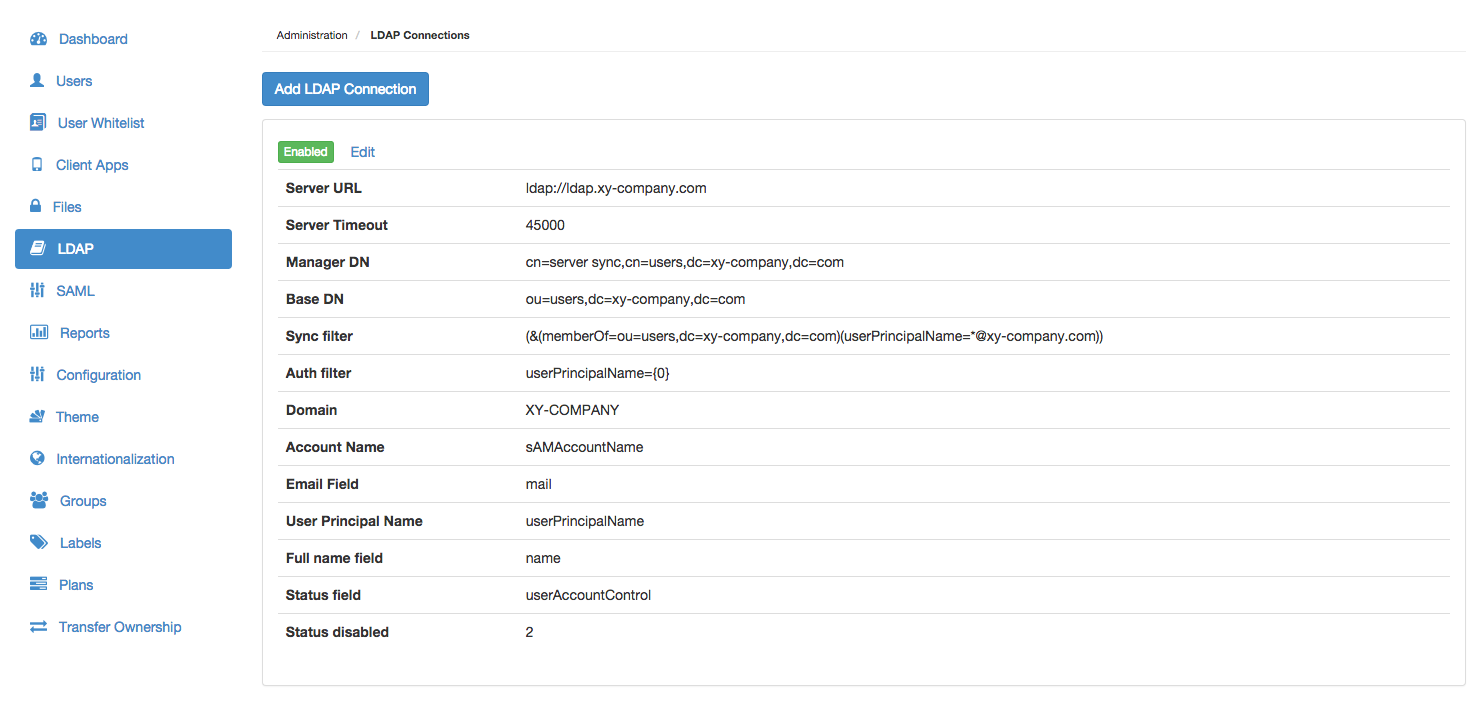
A Covata Platform administrator can add Covata users from an LDAP server/user directory by configuring an LDAP connection on their Covata Platform instance.
The Covata Platform permits the configuration of more than one LDAP connection, thereby allowing the addition of users from multiple LDAP servers/user directories.
Note: LDAP connections are only recommended for on-site deployments of the Covata Platform. Covata does not support LDAP connections on cloud-deployed instances of the Covata Platform.
The authentication of an LDAP user on the Covata Platform is delegated to (and handled by) its respective LDAP server. Hence, changing or resetting the password of an LDAP user account is performed through the account's LDAP server/user directory.
An LDAP user account can only be disabled or re-enabled through the account's LDAP server/user directory.
Modifications to the fields of an existing Covata Platform LDAP user are conducted through the account's respective LDAP server/user directory...
These modifications are propagated through from the account's LDAP server/user directory to the Covata Platform when the Covata Platform next synchronizes with the LDAP server. By default, the LDAP synchronization frequency is five minutes.
As such, other than Roles, it is not possible to edit any of the other fields of an LDAP user through the Covata Platform.
To ensure that field modifications to LDAP user accounts are propagated through to the Covata Platform, verify that these accounts' respective LDAP connections have been enabled.
In the Add LDAP connection dialog box, complete the LDAP connection fields described in the table (below).
( Optional ) Test the connection by clicking the Test connection button. Note: A message will be displayed indicated whether or not the connection to the LDAP server was successful.
Click Save and the LDAP connection will appear as a new entry on the LDAP Connections page. Note:
All accounts in the LDAP user directory will appear as new user accounts on the Covata Platform when the Covata Platform next synchronizes with the LDAP server.
All new LDAP user accounts added to the Covata Platform from an LDAP server/user directory automatically have the Originator role.
If the email address of an existing user account on the Covata Platform matches that of the Email field of a user in the LDAP user directory, then a new account will not be added to the Covata Platform for that account in LDAP (during synchronization).
Editing an existing LDAP connection
To edit an existing connection to an LDAP server/user directory on the Covata Platform:
Scroll to the relevant LDAP connection and click its Edit link.
In the Edit LDAP connection dialog box, modify the LDAP connection fields described in the table (below).
( Optional ) Test the connection by clicking the Test connection button. Note: A message will be displayed indicated whether or not the connection to the LDAP server was successful.
Click Save and the LDAP connection will be updated. Notes:
To ensure that any modifications to user accounts in the LDAP user directory are propagated through to the Covata Platform, verify that this LDAP connection has been enabled.
Since the Email address field of all user accounts on the Covata Platform is unique (because each account's Email address defines a user's unique identity and is also used for auditing purposes), then:
If an LDAP user's email address is modified through its LDAP server/user directory, a new Covata user account will be created for that user upon next synchronization (and their original Covata user account is no longer used).
If this LDAP user's email address is modified back to its original address, the user's original Covata user account will be used again upon next synchronization (and their former Covata user account is no longer used).
The following table describes all LDAP-related fields which are required by the Covata Platform for a successful connection to an LDAP server/user directory. All of these fields are mandatory.
Note: The content of the following table appears on the Add/Edit LDAP Connection dialog boxes. It is reiterated below for the convenience of LDAP administrators who themselves are not a Covata Platform administrator, but need to provide the values of these fields to their Platform administrator.
Field
Description
Maximum Length
(where applicable)
Server URL
The address of the server running LDAP. LDAP over TLS is also supported. Example:ldap://ldap.xy-company.com
Server timeout
The amount of time (in milliseconds) that the Covata Platform will wait when attempting to connect to or read data from the LDAP server.
Manager DN
The Distinguished Name (DN) of the 'manager' user who has privileges to perform LDAP authentication and synchronization and browse the Base DN.
512
Manager password
The password for the 'manager' user who has privileges to perform LDAP authentication and synchronization and browse the Base DN.
128
Base DN
The root node in LDAP from which the Covata Platform finds users and groups. Example:ou=users,dc=xy-company,dc=com
512
Sync filter
The filter used to specify which Covata users will be synchronized based on their LDAP path and attributes. Examples:
Syncrhonising users from a group: (memberOf=CN=groupName,OU=users,DC=xy-company,DC=com)
All users: (&(objectclass=user)(objectcategory=person))
Users whose email matches a domain: (&(&(objectclass=user)(objectcategory=person))(mail=*@xy-company.com))
512
Auth filter
The LDAP field against which the Covata Platform matches the email address of a Covata user when they authenticate. Example:userPrincipalName={0}
512
Domain
The domain for the LDAP user directory.
64
Account name
The LDAP field used to specify an additional/other name for Covata users. Example:sAMAccountName
Note: This field is required for internal Covata Platform functionality.
64
Email field
The LDAP field used to specify the email address for Covata users. Example:mail
Note: Each email address from this field defines a Covata user's identity and forms part of the Covata user's sign-in credentials.
64
User principal name
The LDAP field used to specify the external user identifier for Covata users. Example:userPrincipalName
Note: This field is required for internal Covata Platform functionality.
64
Full name field
The LDAP field used to specify the first name for Covata users. Example:name
64
Status field
The LDAP field used by the Covata Platform to determine whether or not a user is disabled. Example:userAccountControl
64
Status disabled
The value of the Status field (in the LDAP directory) to indicate that a user is disabled.
64
Disabling or re-enabling an LDAP connection
Disabling an LDAP connection stops the Covata Platform from synchronising with that LDAP connection's server/user directory. Once an LDAP connection has been disabled, however, the LDAP users (which had previously been added through this LDAP connection) can still sign in to the Covata Platform via delegated authentication. This is on the assumption that these user accounts have not been disabled or deactivated in their LDAP user directory.
Disabling an LDAP connection is useful if synchronization events between the Covata Platform and LDAP server impair network traffic. However, disabling an LDAP connection also prevents updates to LDAP user accounts (in their user directory) from being propagated through to the Covata Platform.
To disable, enable or re-enable an LDAP connection on the Covata Platform: