

Other properties in configuration files can be modified by system administrators responsible for setting up on-site deployments of the Covata Platform.
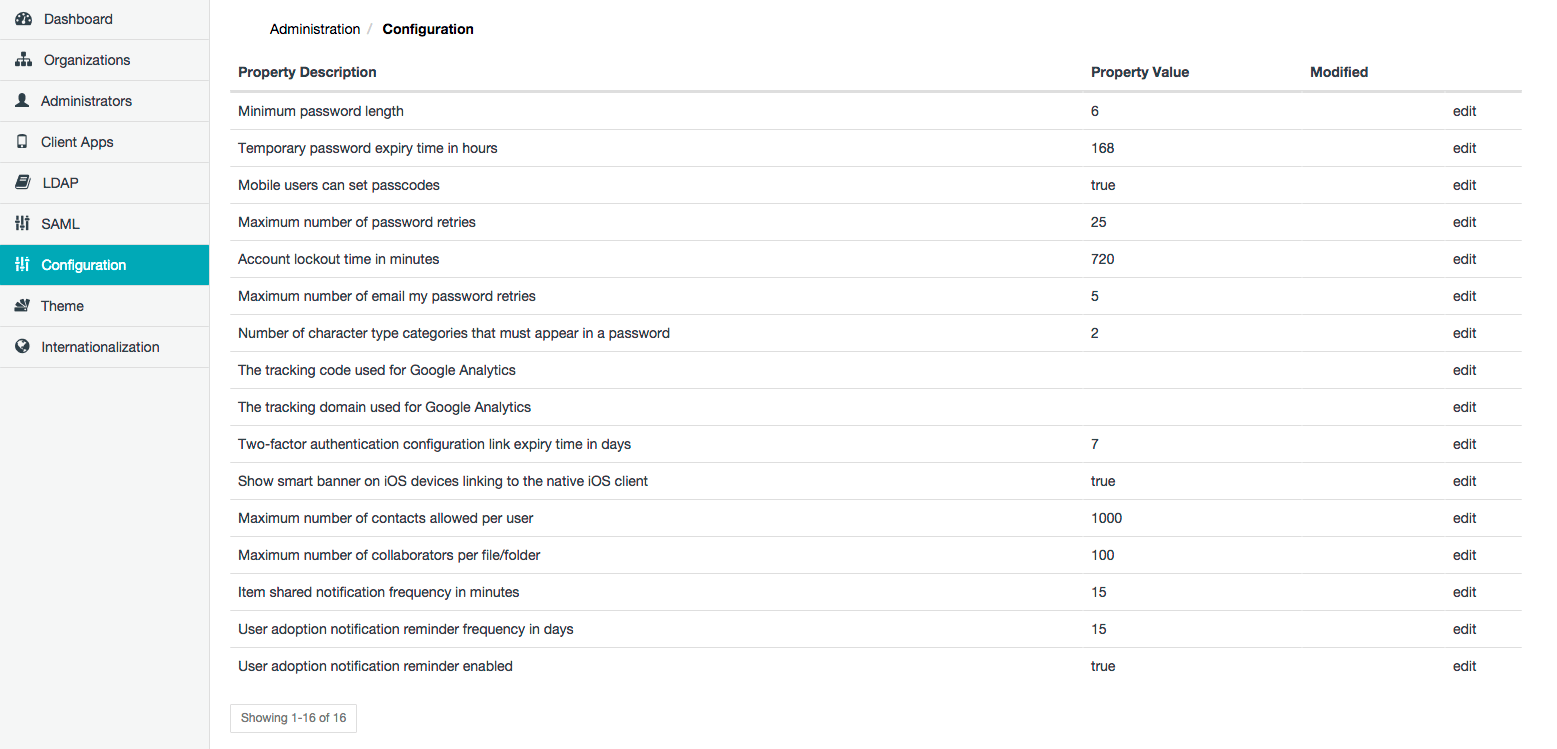
| Property | Detailed description |
|---|---|
| Minimum password length | The minimum number of characters required for a Local user’s password. This property has no affect on LDAP user’s password since the authentication of LDAP users is delegated to their respective LDAP server. |
| Temporary password expiry time in hours | When a new Local Covata user account is created, the user receives an email notification containing a temporary password (generated by the Covata Platform), which the user requires to set their own password for their user account. Hence, the value of this property defines the validity of this temporary password. Note: If this temporary password expires, the user can still set their password through the Covata Sign-in page by clicking either the Don’t have a password? or Forgot your password button and following the instructions in the resulting email notification sent to their email address. |
| Mobile users can set passcodes | This property’s functionality has been superseded by the Allow Device Registration feature (available when registering a client application on the Covata Platform). Therefore, this property is no longer used and will be removed in a future Covata Platform release. |
| Maximum number of password retries | The maximum number of incorrect sign-in attempts permitted by a Covata user mistyping their password before the user account becomes locked. The user will need to do one of the following to unlock their account: • Follow the instructions in the email notification which is sent to the user after their account is locked. The email notification contains a link to unlock the user’s account. The validity of this link is equivalent to the Account lockout time in minutes (below). • Wait until their account is unlocked; the duration of this period is defined by the Account lockout time in minutes (below). • Reset their password by clicking either Don’t have a password? or Forgot your password on the Covata Sign-in page. |
| Account lockout time in minutes | The amount of time that a Covata user needs to wait before their user account (which was locked as a result of the user mistyping their password beyond the Maximum number of password retries above, during sign-in) is automatically unlocked by the Covata Platform. This amount of time also defines the period for which the link to unlock a user’s account (contained in the email notification sent to the user) is valid. Important: Ensure this value is positive and do not set it to 0 (zero). Setting this value to 0 locks a user account indefinitely (as a result of the user mistyping their password beyond the Maximum number of password retries above) and as a Safe Share administrator, increases the risk of you locking yourself out of Safe Share Administration if you mistype your password. If this value was 0 following a Covata Platform upgrade, then change it to a positive value. |
| Maximum number of email my password retries | The maximum number of times that a Covata user can click either Don’t have a password? or Forgot your password, be sent an email notification containing either a one-time access link/password or password reset instructions and fail to successfully sign in, before their account is locked. Notes: • Ensure that this value is positive and do not set it to 0 (zero). Doing so increases your risk (as a Safe Share administrator) of locking yourself out of Safe Share Administration in the event that you mistype your password. • Although a Covata user may click either Don’t have a password? or Forgot your password successively, an email notification from this action is only sent out at a rate of once every five minutes. This default value is defined by a property that can be modified by system administrators responsible for setting up on-site deployments of the Covata Platform. |
| Number of character type categories that must appear in a password | There are four categories of character types that can be used in a password: • Lower case letters • Uppercase letters • Numerals • Special characters The value of this property determines how many of these four character type categories must be present in a password (whenever it is set) for this password to be valid. For instance: • Specifying 1 means that the characters in a password only need to derive from one of the categories above. • Specifying 2 means that the characters in a password must derive from at least two of these categories, etc. |
| The tracking code used for Google Analytics | The tracking code given to you when you sign up for Google Analytics. Note: For Google Analytics to work with your Covata Platform instance, this value must be used in conjunction with The tracking domain used for Google Analytics (below). |
| The tracking domain used for Google Analytics | The domain of your Covata Platform’s web server. Note: For Google Analytics to work with your Covata Platform instance, this value must be used in conjunction with The tracking code used for Google Analytics (above). |
| Two-factor authentication configuration link expiry time in days | When two-factor authentication (2FA) has been enabled on a Covata user account (by the user themselves through the Safe Share web application, Organization Administration or Safe Share Administration, by a Safe Share administrator on any Safe Share administrator’s account, or by an Organization administrator for all members of their organization) the user receives an email notification informing them about this. This email notification contains a time-limited configuration link, which leads to step-by-step instructions for the user to: • configure their mobile device with an appropriate authenticator application (aka authenticator app), as well as • configure the authenticator app with the Covata user account (thereby allowing the app to generate appropriate authentication codes). Hence, the value of this property defines the validity of this configuration link. |
| Show smart banner on iOS devices linking to the native iOS client | Sets a ‘flag’ on the Covata Platform which results in a smart banner appearing at the top of Safe Share web application pages whenever it is accessed through Safari on iOS devices. This encourages users of iOS devices who have clicked a direct URL to an item from ‘A file/folder has been shared with you’ email notification (which opens the item in the Safe Share web application) to access the item in Safe Share for iOS instead (by clicking the link in the smart banner). |
| Maximum number of contacts allowed per user | The maximum number of contacts that any given Covata user can add to their account through the Safe Share web application, as well as Safe Share for Windows or iOS. |
| Maximum number of collaborators per file/folder | The maximum number of collaborators which are permitted on an item through the Safe Share web application, as well as Safe Share for Windows or iOS. Note: Be aware that this limit includes collaborators on an item which have been implicitly inherited from folders (containing this item) to which collaborators have been explicitly added. |
| Item shared notification frequency in minutes | The time interval defining the frequency with which email notifications for shared items (i.e. ‘A file/folder has been shared with you’) are sent by the Covata Platform. Note: If any given Covata user has multiple items shared with them during one of these time intervals, the user will receive a single email notification (at the end of the interval) listing all the items that were shared with them since the previous interval/notification they received. |
| User adoption notification reminder frequency in days | The number of days between each of a series of user adoption email notifications being sent out to new Covata users with the Originator role. See the User adoption notification reminder enabled property’s description (below) for more information about these types of email notifications. Notes: For this Safe Share Administration property to take effect, the User adoption notification reminder enabled property (below) must be set to true. |
| User adoption notification reminder enabled | Determines whether (i.e. true) or not (i.e. false) the Covata Platform sends a series of user adoption email notifications to new Covata users with the Originator role. Each of these email notifications contain tips and information to encourage these new Covata users to use Safe Share applications (for example, how to share data using these applications). Notes: • There are a series of four user adoption email notifications which are sent out at a frequency defined by the User adoption notification reminder frequency in days property (above). The user adoption email notification period is defined as the number of different user adoption email notifications (four) multiplied by the User adoption notification reminder frequency in days property value (15 days by default), which is a default of 60 days. • User adoption email notifications are only sent out to new Covata user accounts from the time their account is first created (either through Safe Share Administration or Organization administration). If a Covata user with an existing account is added to a new/different organization (even with the Originator role), they do not receive any user adoption email notifications. • If an existing Covata user is granted the Originator role for the first time (within any organization), they do not receive any user adoption email notifications unless their user account was granted the Originator role within the user adoption email notification period of their account’s creation date. If so, such a user would receive user adoption email notifications for the trailing part of this period. |
Modifying a Safe Share Administration property value
To modify a Safe Share Administration property value:- Sign in to Safe Share Administration.
- Click the Configuration option on the left of the Safe Share Administration interface to open the Configuration page.
- Click the Edit link to the right of the relevant Safe Share Administration property.
- In the Edit Configuration dialog box, update the Property value field as required.
-
Click Save and the value of the Safe Share Administration property is modified with immediate effect.
Notes:- The Modified column’s field value is updated to indicate the current date and time (i.e. when the property’s value was last modified). If no date and time is indicated, then the property’s value was never modified and its default value is being used.
- For properties whose value consists of a simple
trueorfalse, the Edit Configuration dialog box has a Property Value check box, which should be selected fortrueor cleared forfalse. - It is not possible to modify the names of Safe Share Administration properties, since these are fixed.