

-
Safe Share Organization Administration activities; such as activities relating to:
- user administration; specifically user addition, import or removal,
- the addition of classifications,
-
group management; specifically:
- the addition of a group,
- the modification of a group’s members, classifications or details or
- the removal of a group,
- plan and user quota management; specifically the addition or removal of a plan,
- file administration; specifically disabling or (re-)enabling files/Secure Objects. For more information about Secure Objects, see Administering files.
-
Activities relating to organization users with other roles (typically performed through Safe Share products), such as:
- file/Secure Object creation,
- file decryption (including decryption of a file’s read-only view); requiring the retrieval of the required key/s from the Covata Platform,
- the retrieval of items’ details; for example, these types of activities are required when files and/or folders are listed through Safe Share products,
- sharing items (i.e. file and/or folders) with collaborators,
- managing an item; for example, renaming, moving or removing an item.
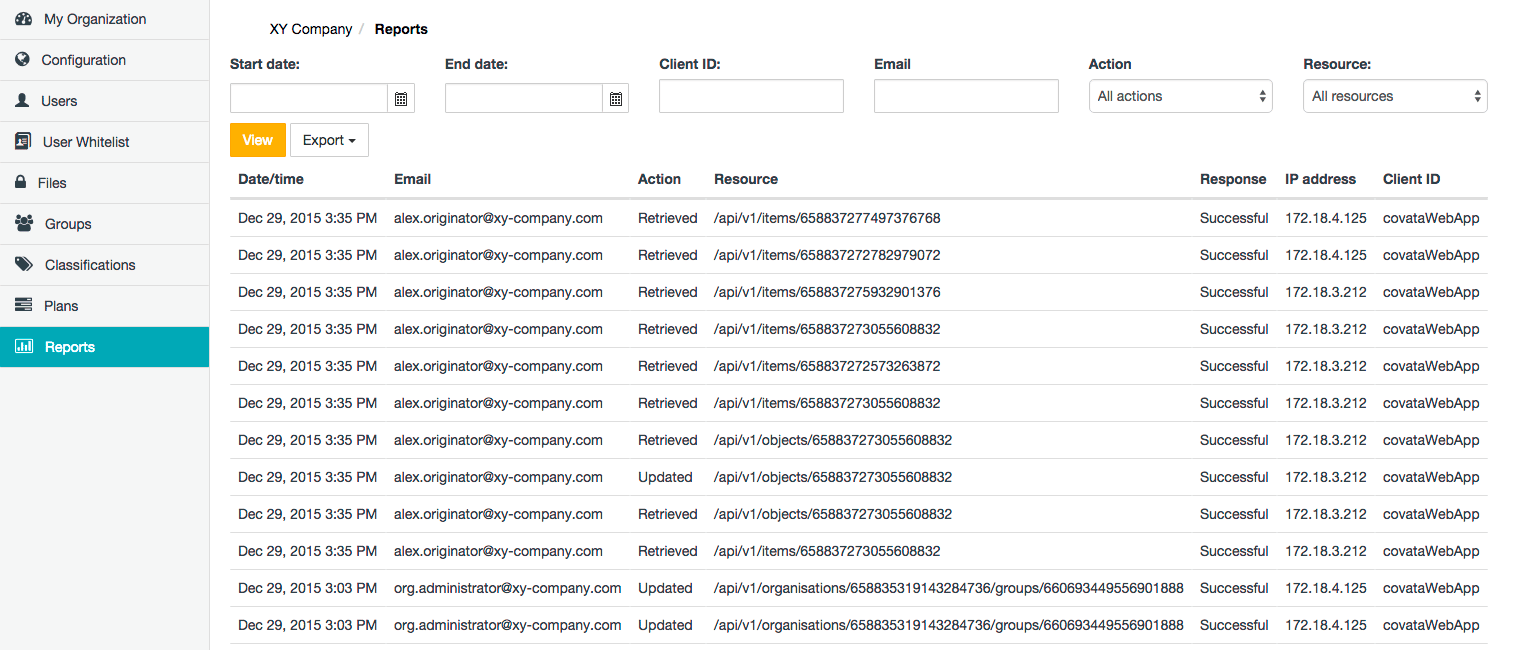
Activity fields
Each activity (i.e. ‘activity item’) on the Reports page represents a request to an endpoint of the Covata Platform API. Each activity on this page consists of the following fields:Generating a report
Each time the Reports page is opened, the most recent 25 activities (i.e. API requests) are displayed in reverse chronological order. Older activities can be accessed using the page navigation buttons (lower-right of the Reports page). Activities on this page can be viewed as well as exported to either PDF or CSV format, where CSV is useful if this report data requires subsequent manipulation. Due to the heavy volume of activities accessible through this page, it is useful to filter the activities by criteria relevant to your requirements before generating the actual report. To generate a report of user activities recorded within your organization:- Sign in to Safe Share Organization Administration.
- Click the Reports option on the left of the Safe Share Organization Administration interface to open the Reports page, which displays the most recent 25 activities in reverse chronological order.
-
Filter the activities according to the following filter fields available at the top of this page:
-
Do any of the following:
- Click the View button to filter the activities on the Reports page to items that match all filter field criteria (above).
-
Click the Export drop-down menu and choose:
- PDF to generate a PDF format document of these activities filtered according to the criteria (above).
- CSV to generate a CSV format file of these activities filtered according to the criteria (above).