

- The addition of new classifications.
- Existing classifications to be removed.
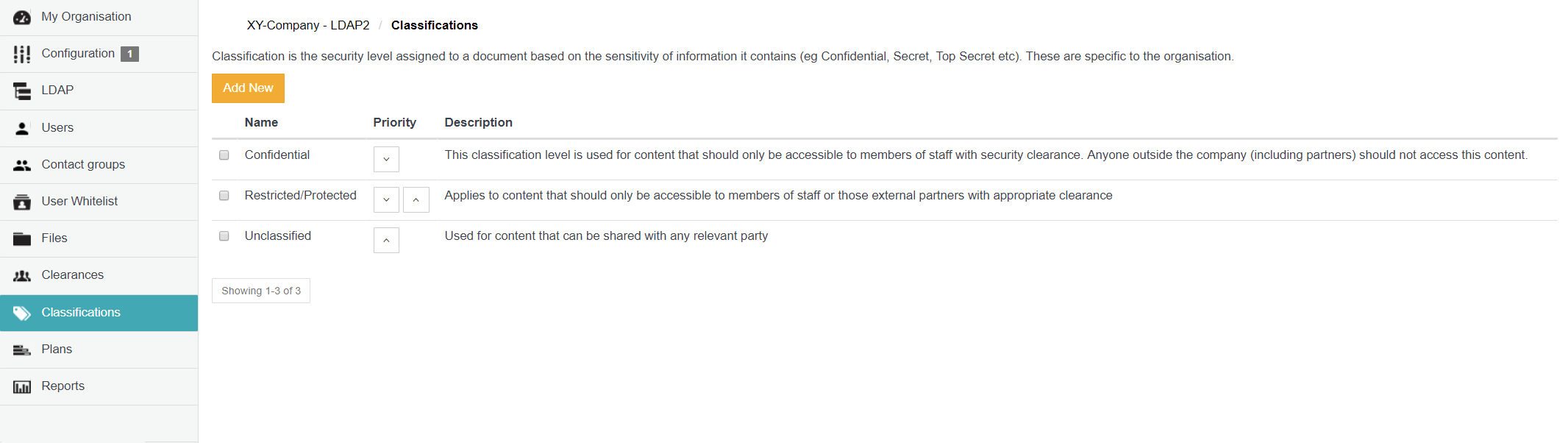
Adding a new classification
To add a new classification to your organisation on the Cocoon Data Platform:- Ensure you are signed in to Organisation Administration.
- Click the Classifications option on the left of the Organisation Administration interface to open the Classifications page.
- Click the Add New button.
-
In the Add new classification dialog box, specify the:
- Name - The value of this field is the name of the classification shown to Cocoon Data users of SafeShare applications (when sharing an item), including client applications utilising the Cocoon Data Platform’s API.
- Description ( Optional ) - A longer description to provide more information about the classification, such as the classification’s purpose or which group of people it is intended for. The value of this field is only visible to Organisation administrators on this Classifications page.
-
Click Save and the new classification is added and will appear as a new entry on the Classifications page.
Notes:- To associate this classification with one or more Cocoon Data users (as a clearance group), which would allow this classification to restrict file sharing to these users, see Managing clearances.
- It is recommended that any newly added classification be associated with at least one clearance group of Cocoon Data users as soon as possible, since a classification (which is not yet associated with any such clearance + users) but is then chosen when sharing a file, prevents that file from being shared.
Removing an existing classification
Removing a classification removes that classification from all files it was applied to (when these files were shared), as well as removes all collaborators from these files. To remove an existing classification from your organisation:- Ensure you are signed in to Organisation Administration.
- Click the Classifications option on the left of the Organisation Administration interface to open the Classifications page.
- Locate/scroll to the relevant classification and select its check box on the left.
- Click the Remove button. A Delete Classification message box appears, with a warning that the removal of this classification will remove the classification from any files it had been applied to (when the files were shared).
Note: Before proceeding, be aware that this action removes all collaborators from these files too. - Click Yes on this message box to proceed with the classification’s removal.