

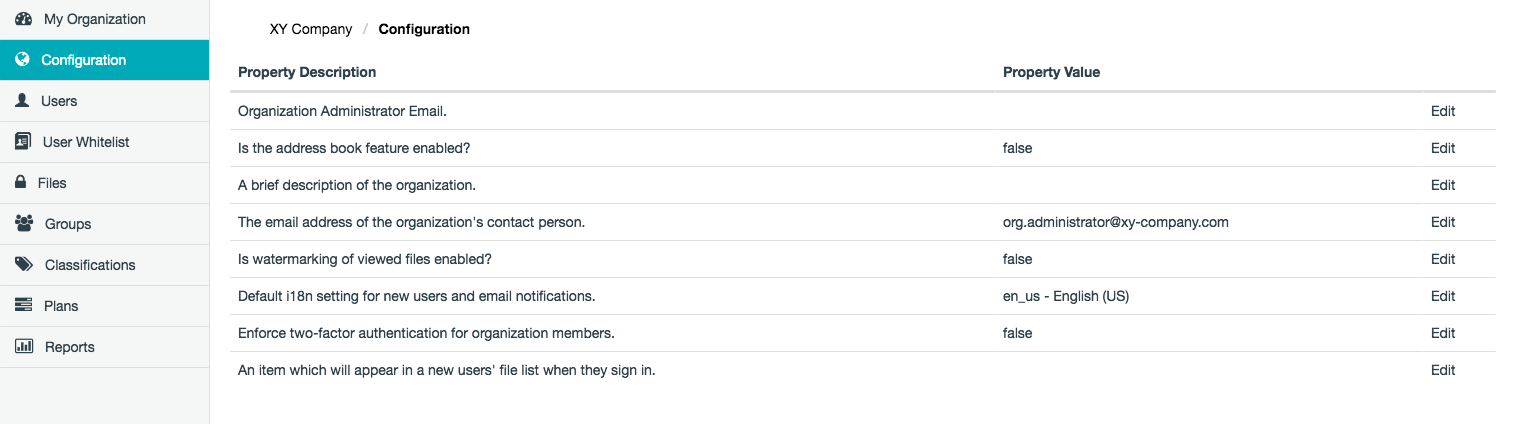
Modifying a Safe Share Organization Administration property value
To modify a Safe Share Organization Administration property value:- Sign in to Safe Share Organization Administration.
- Click the Configuration option on the left of the Safe Share Organization Administration interface to open the Configuration page.
- Click the Edit link to the right of the relevant Safe Share Organization Administration property.
- In the Edit Config Property dialog box, update the Property value field as required.
-
Click Save and the value of the Safe Share Organization Administration property is modified with immediate effect.
Notes:- For properties whose value consists of a simple
trueorfalse, the Edit Config Property dialog box has a Property Value check box, which should be selected fortrueor cleared forfalse. - It is not possible to modify the names of Safe Share Organization Administration properties, since these are fixed.
- For properties whose value consists of a simple
Safe Share Organization Administration properties
The following Safe Share Organization Administration properties are available:| Property | Detailed description |
|---|---|
| Organization Admin Email | The contact email address, typically for an Organization administrator, which is: • used in Covata Notification email messages and • is accessible from the Need help? … link on the Authentication code entry page for two-factor authentication (2FA) whenever a Covata user with 2FA enabled on their account signs in through the Covata Sign-in page. If a Covata user cannot successfully sign in (typically due to the user losing the ability to generate authentication codes for their 2nd authentication factor), the user can click this Need help? … link to begin emailing their Organization administrator a request to re-configure 2FA for their user account. See Administering users within an organization in the Safe Share Organization Administration section of this guide for more information. Notes: • This property’s default value is empty. In such circumstances, the Admin Email property’s value (defined through System details properties - see Configuring Safe Share Administration properties for more information), is used as the fallback. • Two-factor authentication is enabled by the user themselves for their own account through the Safe Share web application, Organization Administration or Safe Share Administration interfaces, by a Safe Share administrator for any Safe Share administrator’s account, or by an Organization administrator for all members of their organization. |
| Is the address book feature enabled? | Determines whether (i.e. true) or not (i.e. false) the organization’s address book feature is enabled. The address book feature allows a user to discover (through autocompletion) other Covata user members within their organization by the user typing the first few characters of a member account’s email address, when sharing an item. If this property’s value is: • true, this discovery feature will be scoped to all Covata user accounts that are members of the organization, as well as all of the user’s own contacts. • false, this discovery feature will be scoped only to all of the user’s own contacts. |
| A brief description of the organization. | As the name of this property indicates. This field’s purpose is only to provide Organization administrators with additional information about their organization. Be aware that this description: • is not displayed anywhere else throughout the interfaces of Safe Share Administration, Organization Administration and Safe Share applications, and • cannot be cleared once it has been set. |
| The email address of the organization’s contact person. | As the name of this property indicates. This property’s purpose is to provide Safe Share administrators with the email address of the organization’s contact person, which appears in the Contact Person column on the Organizations page of Safe Share Administration. Be aware that this contact person: • is initially the email address of the Organization administrator set when a Safe Share administrator added the organization to the Covata Platform, • is not displayed anywhere else throughout the interfaces of Organization Administration and Safe Share applications, and • cannot be cleared. Notes: • This property is useful for allowing Safe Share administrators of your Covata Platform instance to contact (by email) the appropriate person responsible for administering your organization. • This property is unrelated to the Organization Admin Email property (above), whose value is accessible to Covata users from Covata Notification email messages and the Need help? … link on the Authentication code entry page for two-factor authentication (2FA). • For more information about how organizations are added to the Covata Platform, see Adding a new organization in Administering organizations. |
| Is watermarking of viewed files enabled? | Determines whether (i.e. true) or not (i.e. false) the watermarking feature is enabled for all viewable files/Secure Objects created within your organization. The watermarking feature: • Only applies to collaborators viewing files that have been shared with them. This feature is intended to discourage collaborators from copying file views by other means (e.g. using screenshot capturing tools, etc). • Covers a file’s view with large semi-transparent text that consists of the email address of the currently signed-in collaborator viewing the file, the Covata Platform’s URL, the ID of the file/Secure Object, the classification applied to the file by its owner (if applicable) and the date/time when the file was viewed. |
| Default i18n setting for new users and email notifications. | The default language for all new Covata user accounts created on the Covata Platform * as a result of the users’ accounts being added to the organization. • This setting overrides the System Default language setting set by a Safe Share administrator for their Covata Platform instance. • This property’s initial value is the current System Default language setting Note: Users can always choose/set their own account’s language settings through their own account editing features in the Safe Share web application (or Organization Administration). * These new user accounts are created because the user’s email address has not yet been registered on the the Covata Platform. |
| Enforce two-factor authentication for organization members. | Determines whether (i.e. true) or not (i.e. false) the two-factor authentication (2FA) feature is enforced for all Covata users who are members of your organization. This includes your own Organization administrator account. Note: Take caution before setting this value to true. If any members of your organization (including yourself) are not prepared to configure 2FA on their account, they may be unable to sign in successfully through the Covata Sign-in page, thereby preventing these users’ access to: • all organizations on the Covata Platform for which these users are members and/or • Safe Share Organization Administration for all organizations of which these users are Organization administrators. For more information about 2FA, see Enabling or disabling 2FA on Organization user accounts. |
| An item which will appear in a new users’ file list when they sign in. | A file/Secure Object or folder/collection that an Organization administrator can choose to be automatically shared with Covata users in the organization who acquire the Originator role. When an Organization administrator chooses one of their items through this property, this feature becomes active, which results in any users within the organization who subsequently acquire the Originator role being automatically shared this chosen item. A user’s account acquires the Originator role when this account is either: • added to the organization with the Originator role, or • an existing organization member that is subsequently edited to grant it/upgrade it to the Originator role. The purpose of this feature is to provide users (who acquire the Originator role) with immediate access to an item/content that provides information about adopting the use of Safe Share products to share data securely. However, any item/content can be chosen for this property. Be aware that this feature has the following requirements and characteristics: • A Covata user account with the Organization administrator role must also have the Originator role as the item chosen by the Organization administrator must be one they own. • All items shared automatically through this feature (regardless of whether the item is a file or a folder) are done so with Download permissions. • This property’s current item can be changed by any Organization administrator, regardless of the item’s ownership. However, the Organization administrator (modifying this property) can only choose an item they own. • Once this feature becomes active, existing Covata users in the organization who have the Originator role are not automatically shared this property’s current item. However, if one of these users’ accounts is removed from the organization and subsequently added again (with the Originator role), the user’s re-added account is automatically shared this property’s current item. • If this property’s item is actually located within a folder, then the item will appear at the root level of the items area for users who subsequently acquire the Originator role in the organization. Notes (and idiosyncrasies) about this feature: • Take caution before setting this item. Once an item has been chosen, this feature becomes permanently ‘active’ and from this point on, it is no longer possible to deactivate this feature. • If an Organization administrator chooses a folder for this property, then only the folder itself (i.e. none of its existing content) is automatically shared with users in the organization who subsequently acquire the Originator role. However, if this Organization administrator then adds new items to this folder, the accounts of any users who had previously been shared this folder (automatically through this property/feature) are also be shared these newly added items. This behavior will be reviewed for a future Covata Platform release. • If this property’s item is set to a folder and you wish to remove this particular folder (through a Safe Share product or other client application), change this property to a different item before removing this folder. Otherwise, the folder will not be completely removed from Safe Share. This issue will be resolved in a future Covata Platform release. |