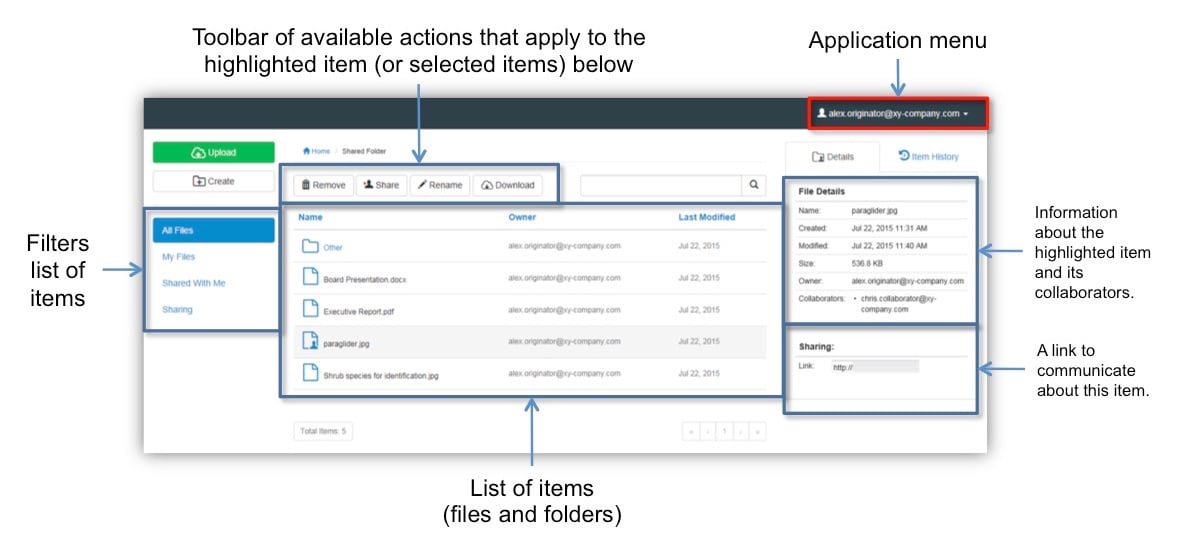
Overview
The Safe Share Compatibility Mode for Web* (of the Covata Platform) allows you to securely share and access any data anywhere. Using Safe Share, you can securely upload, store, download and share large files easily through a web browser on your computer. Since Safe Share is a web application, it can be accessed from any location - even publicly beyond an organization’s private network, thereby allowing files to be shared securely between an organization’s people (especially those on the move) as well as external people, such as customers and partners. All uploaded files are encrypted before they reach storage managed by the Covata Platform. The owners of these encrypted files can share these files with other people within their organization, including any other external people who may not yet have been registered on the Covata Platform. The Safe Share web application can be accessed conveniently from your desktop/laptop computer, a tablet or a phone or any other device with a compatible web browser. * The Safe Share Compatibility Mode for Web is a feature-restricted version of the full-featured Safe Share web application. This feature-restricted version is expressed when accessing the Safe Share web application through an older web browser such as Internet Explorer 9. Older web browsers use outdated technologies and typically have fewer functional features than modern web browsers, which is why the Safe Share Compatibility Mode for Web supports fewer features than its full-featured counterpart.Functional overview of the main Safe Share page